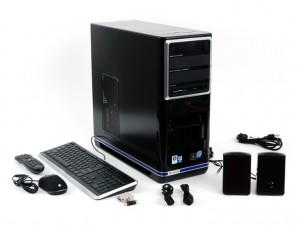
I recently purchased a refurbed Gateway LX 6810 Desktop PC on a pretty sweet deal <500. I’m not a fan of buying a built desktop, but this one had a lot of great components and a few features I was looking for:
 Nvidia GT120 Graphics Card with 1gb video RAM. DVI, CRT, and HDMI output.
- Intel Quad Core processor
- 8gb RAM
- HD TV Tuner Card
- 7.1 Dolby surround
- Built in memory-card reader
- Free 64-bit Windows 7 upgrade
- Expandable
- Slick looking case (living room friendly)
- Keyboard, mouse, speakers, etc..
Anyway, the one thing it is lacking are case fans. There are 0 when you buy it. There is a CPU fan and a fan on the video card, but thats it. If you buy this computer, you will need to install at least one 120mm fan in the back of the case… I recommend adding an 80mm in the lower front. It will cost you about $15 and 10 min, but it will save you all the trouble an overheated PC offers.
Hey, i’ve considered several times getting this computer but have been kinda put off by all the shutdown issues… I look around and come back to the nice specs for the price this one offers so I ask since you added fans have you had any issues?
I would think more would have tried adding them but it just seems to have alot of complaints?
Hi Jason, I’ve had this running constantly since I bought it and haven’t seen any issues yet. Only change I made was adding a $10 fan to the back. I’d say go for it… computer is pretty awesome!
Hello, I have the same model and also a refurbished one. I left it off for 3 days then turned it back on, it runs about 10 minutes and shut off again. Is it really an overheat issue? Thanks
This sounds just like an overheating issue. Have you installed a fan? I would recommend doing this. If you do not know how, you can mail me your computer.. (just kidding).. it is a pretty simple task to accomplish. If you’re in a big city, you might be lucky enough to have a Tiger Direct, where they will do that type of work for you at a really low cost..
I forgot to say that, yes it turned off repeatedly previously and it’s still doing that.
I ordered fans from ebay but they came in with connectors too large to use.
What do I look for when I purchase another?
Thanks
Robert
Hi Robert.. this is the fan I bought for $5.99 – Masscool Case Fan – 120mm
Great post thx!
i want to try your idea but how to add the fan? Where we connect it?
There should be an open spot on the mobo that you can add it to.. I’ll look into adding a pic to the post to show how it works.
also new thermal compound between the heatsinks and chipsets
all of them mainly the onboard gpu its below the cpu.recomend artic silver 5! mine had this problem too now its a beast.when i saw the factory compound on there it was all bubbled and dried up.this is an important part to make the heatsink work well.
I had the same shutting off problem with mine. Since it happened while it was still under warranty i sent it back to get fixed. It came back and ran fine until now. I think it is doing it again though. I am going to try and add the extra fan. Does anyone know what type of fan that I need to buy?
Hi, Well I’m no pc tech however….It’s not the fan. Why do I know this? Because it also shuts off after running 30 seconds. Then after many reboots it may run for 6 hours. Sometimes I do something and it appears fixed but returns after a few weeks. It’s very bad now. I tried pulling out the ram and all the boards except graphics. I had added usb 3.o and a sound card but had the shutting off problem before. I thing the on switch is very touchy. Seems very sensitive. Oh, I’ve had the problem for a year but it seems to go away sometimes….getting ready to junk it or replace the motherboard???
I recently started having this problem again. Opened up the PC and the heatsink was clogged with dust. Try checking around the CPU fan and make sure there is good airflow happening.
Its 2012 and I have has this problem for a while. I had a few fans in my electronics junk box. I used two of them. They are 80mm fans. One fit on the front drawing air in from the front over the mother board. black tabs on the inside of the case will release the black cover easily. Don’t force it out. You need to do this to screw on the 80mm fan (made for a 80mm fan. I put another 80mm fan on the back that sucked air out from the box to the outside. Made for a 120mm fan but there are screw holes for an 80mm fan. Since I had that, I connected that. These are 110V fans. They sounds like an airplane taking off and I connected them to my 110v outlet. Two days and has not turned off on me. I think this was the solution.
Mine shuts down sometimes within a minute of a cold start; sometimes after hours of running, so seems unlikely to be heat-related. However, it tends to crap out soonest with full-screen video. I swapped video cards, which didn’t help. Any other ideas?
Have you tried blowing out the CPU fan? It really depends on a number of factors, but it could definitely still be heat related… especially if your video card puts off a bit of heat.